
Dashboard
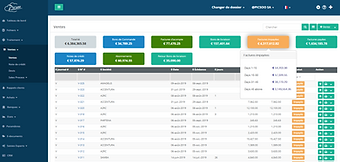
The dashboard gives you an overview of your company’s financial situation. Stay up to date with your bank balances, unpaid invoices, real-time cash flow, and profit and loss. This helps you keep your business on track and understand its overall financial health.

Invoicing / Sales Cycle
The invoicing settings allow you to customize your PDF invoices and choose from our predefined templates.
From quotes to invoices — including down payments, purchase orders, and delivery notes — Picsoo enables automated posting of entries through its preconfigured settings at both item and customer or supplier levels. The user-friendly input templates make the process much easier for users.
Purchases
Record invoices, manage your inventory, and prepare your VAT return. Whether you’re entering a service invoice or a goods purchase, Picsoo instantly updates all your accounting, tax, and VAT data in real time.

Pricing Management
Picsoo manages several types of pricing and discounts: direct discounts (set by default if needed in the customer profile), discounts based on item and customer categories, as well as price code discounts based on quantities.

Inventory – Stock Management
Picsoo automatically updates all information related to sold items. The inventory is available in both PAMP and FIFO formats.
You can easily view a complete history of all transactions related to a specific item.
Recovering unpaid receivables
Picsoo places great importance on recovering unpaid receivables. Users can create as many reminder types as they wish, which will then be sent AUTOMATICALLY to recipients based on the number of days past the due date. It is still possible to send a specific reminder type individually or in bulk. Picsoo keeps a record of all reminders sent, which users can view by customer.

Accounting
Picsoo brings together all the essential accounting and financial information of your Picsoo clients in a simple, easy-to-navigate space.
Beyond commercial management, Picsoo offers all the features of a complete general accounting system. Quick-entry functionalities (purchases, sales, journal entries, financial operations, etc.) allow experienced users to finalize the company’s accounting management (balance sheet, tax reports, VAT, journals, etc.). Integrations with Codabox, Isabel, and Ponto enable fast financial management (automatic account reconciliation, automatic completion of missing data, and more).
Financial / Banks
Having a complete view of your company’s cash flow is essential for any business. It gives you insight into your income and expenses, helping you balance your revenues and costs. Cash flow provides a clear picture of your company’s profitability and how money is being used at any given time.
Automatically download your bank statements via Isabel or your bank — Picsoo takes care of matching your financial data with your purchase or sales invoices based on multiple criteria.
VAT
Vos données TVA (Déclaration, Listing TVA annuel, Listing intracommunautaire...) sont directement mises à jour et accessibles via nos différents rapports de gestion.Elles sont disponibles au format XML pour pouvoir être transmises directement à l'Administration.
Comprehensive management reports and statements
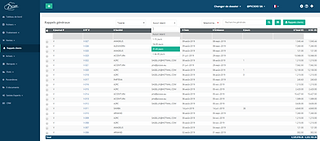
Picsoo includes numerous reports to give you a clear overview of your company’s financial health, with new ones added regularly. Detailed reports such as the balance sheet, profit and loss, trial balance, and aged debtors and creditors make financial management simple and efficient. You can also create comparative reports between different periods to analyze your company’s profitability over time.


Fixed assets
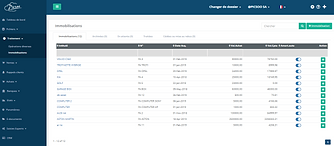
Manage all your company’s fixed assets with Picsoo. Record all relevant information such as the asset code, purchase value, depreciation method, depreciation rate, and depreciation account. You can process depreciation manually and keep your accounting operations up to date.
Automatic depreciation handles all your assets at defined intervals, reducing your workload and ensuring your books remain accurate and current.
Picsoo also allows you to manage the sale and disposal of assets, it takes care of all the background work and automatically creates the necessary accounting entries.
Period & Fiscal Year Closing
Picsoo allows the closing of an accounting period without the need for reopening entries. Everything is managed automatically according to legal accounting principles.
Beyond annual closing, Picsoo also enables the closing of transactions based on multiple criteria (date range, journal, journal type, etc.).
CRM
Our comprehensive CRM keeps you connected with your clients. You can create email campaigns with custom templates, create tasks and appointments, manage leads and opportunities, and more. Our CRM system is continuously updated with new features to make it even more useful for you.
The lead tracking module is extremely helpful for managing all client requests and requirements related to proposals and business opportunities. The lead window is where sales representatives track their email and phone communications.
One of the key goals of Picsoo’s CRM is to generate leads so that potential sales become actual sales and therefore revenue for the company. Lead management in the CRM involves managing potential customers in a structured and organized way, verifying whether they are worth pursuing, and classifying them accordingly to convert them into business opportunities that sales teams can follow up on and close. Picsoo’s CRM can be connected to a digital marketing application to target the right customers with the right products and analyze their behavior during a campaign.
Over time, you can better understand what attracts customers to your products or services and how they behave, by reviewing the information presented in your digital marketing and on your website. This gives you a very powerful way to reach your target users and provide them with the best information in the most effective format.
Picsoo’s CRM tasks provide a simple way to create reminders for the work you need to complete. They can be used as reminders for a meeting, a phone call, a due date, and more.
You can link tasks to contacts or simply add a task as a personal reminder. You can also set up the daily task reminder email to receive a message when you have tasks to complete.
The Calendar view gives you a month-by-month overview of all ongoing tasks, including follow-ups.


E-document
It’s now easy to manage all your documents in one place and quickly find any file you need at any time.
Convert all your expense notes and invoices into digital format. Save time and effort while improving the accuracy of your invoices and accounting data. Simply upload your receipts and invoices to your Picsoo account, and we’ll take care of the data digitization. You can also use our Picsoo mobile app to upload invoices and receipts. There’s no need to worry anymore about lost or misplaced documents.
White Label Solution
Unlike other online management software, we offer a complete white-label solution. This gives your business added value and strengthens your brand identity.
Automatic Backups
Manage your backups automatically (monthly, daily, weekly) or in real time. These backups include all your data in XLS format.


VIP Helpdesk
Our Helpdesk assistants are here to help you. If you would like personalized phone support, feel free to subscribe to this service.
Mobile App Picsoo Touch
Picsoo Touch, our feature-rich mobile app, lets you manage your accounts on the go. Whether you’re traveling by train or relaxing in a café, don’t miss the opportunity to send invoices to your clients or create expense reimbursement requests. Mobile capability is crucial to staying ahead of the competition. Use Picsoo Touch and keep your edge.
Send your invoices as soon as your work is done, speeding up the processing of your accounts receivable. Set up automatic reminders to follow up on unpaid invoices.
Manage customers and suppliers with ease. All your customers and suppliers have complete details, along with history and notes. You can also set default values for each customer and supplier to enable faster billing in just a few clicks.


Analytics & Tracking
Picsoo manages analytics across three vertical levels and two parallel tracking levels, allowing users to group their purchase or sales transactions and generate the corresponding reports.
User Access Management
Picsoo allows you to easily manage user access to all or specific features of the application.

Projects
With our project management tool, you can easily create new projects, define various tasks for each one, and assign a budget to every task. This allows you to set the overall project budget and track actual work against the allocated budget for each task. Your employees can submit timesheets showing the number of hours spent on each task and project, enabling you to invoice clients accordingly.
Get a detailed overview of the overall project budget. Access the budget assigned to each task within the project. View detailed insights into the allocated budget, total work performed, and billed versus unbilled work.
Do you purchase items for client-driven projects and need to get reimbursed? No worries — the process is very simple in Picsoo. When adding a purchase invoice, you can choose whether or not to bill the client. You can then select a specific project and determine the amount to charge the client. This detail can later be included in the invoice when creating it, making the whole process seamless. Take full advantage of every expense that should be reimbursed by a client.
Track each project’s profitability in real time by comparing the allocated budget with the total work completed so far. This allows you to see whether you’re making a profit or incurring a loss on a given project.

Variant Management (sizes/colors/lengths/fabrics/...)
This option allows users to associate a base item with a set of additional attributes (size, color, length, fabric, etc.), automatically generating as many items as there are possible combinations. There are no limits to the attributes or elements that can be included.
For example, for a product such as jeans with 3 sizes, 2 colors, and 2 lengths, Picsoo will generate 12 items (3 x 2 x 2). The details for each item will be identical to those of the original item (purchase price, sale price, accounting account, VAT rate, etc.). However, users can freely modify the information for each generated item.

Multi-Warehouse Management
Picsoo is already designed to handle multi-warehouse management. All the necessary features for this functionality are available in both sales and purchase modules.
Multi-Company Consolidation (12/2020)
Picsoo allows you to consolidate multiple companies into one, enabling you to analyze all financial data and generate consolidated reports.
Expense Reports
Record all your employees’ expenses and reimburse them on time. You can easily manage repayments and get a clear overview of each employee’s spending to identify where costs are higher and where reductions can be made.
Point of Sale (POS) Management
Multi-currency, multi-store, multi-warehouse, multi-user, multi-language management, as well as delivery handling, coupons, gift cards, orders, receipts, invoices, barcodes… all in perfect harmony with Picsoo — or any other application through its APIs.

Time Management / Billing
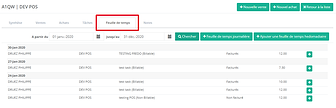
Track every minute spent on each client to analyze profitability. Your employees can select the task they worked on and record the time spent. Use this information to generate invoices, making billing as detailed as needed. You’ll have a clear overview of which employees worked for a specific client, the time spent, and the profitability of each case. Manage service packages and compare them with the actual work performed.

Batch and Serial Number Management
Batch and serial number management will be available during the fourth quarter of 2020. Detailed information about how it works can be obtained from our support team.
